
Search the Tech knowledge base...
-
-
- Articles coming soon
-
- Articles coming soon
-
-
-
- Add Microsoft 365 Email to Mobile Devices
- Add Microsoft 365 mailbox to Outlook Desktop app on Windows
- Backup/Export Contacts, and Calendar Items with Outlook
- Import Contacts and Calendar Items with Outlook
- Installing Microsoft 365 Apps
- Microsoft/Office 365 Migration
- Microsoft/Office 365 Migration (Post-Due Date)
-
-
-
-
- Articles coming soon
-
- Articles coming soon
-
-
-
- Articles coming soon
-
- Articles coming soon
-
-
-
- Articles coming soon
-
-
Written by Jeremy Neece
How to login to Canvas
This article discusses the steps required to login to the Canvas Learning Management System (Canvas).
Who Can Use This Guide?
Any person with a current Canvas account can use this guide. Canvas is available for use by students, educators, and administrators. Louisiana Tech University provides Canvas accounts to its users.
Considerations for signing in to Canvas
- You will need a current @latech.edu or @email.latech.edu account
- You will need your Louisiana Tech UserID (ex. abc123) and password
- You will need the DUO Multi-Factor Authentication application
- To access Canvas in a web-browser, students and staff go to canvas.latech.edu.
- To get the mobile app, you will need to go to your App Store or Google Play Store. Just search “Canvas” and it should look like a red, spotty circle (see figure 1).

Logging in to Canvas
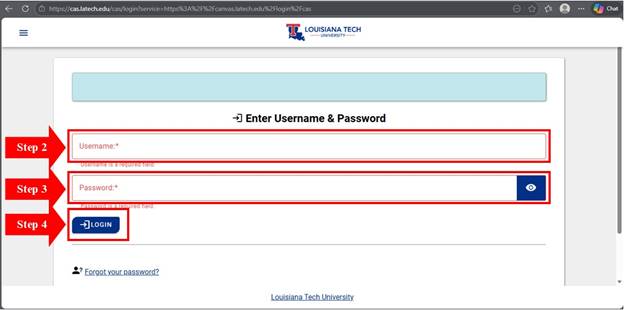
- Open the Canvas application or direct your web browser to canvas.latech.edu. You will be taken to the LA Tech Central Authentication Service (CAS).
- Type your Louisiana Tech UserID (ex. abc123) into the Username field
- Type your CAS password into the Password field
- Click “Login”
- Follow the steps for DUO Multifactor Authentication
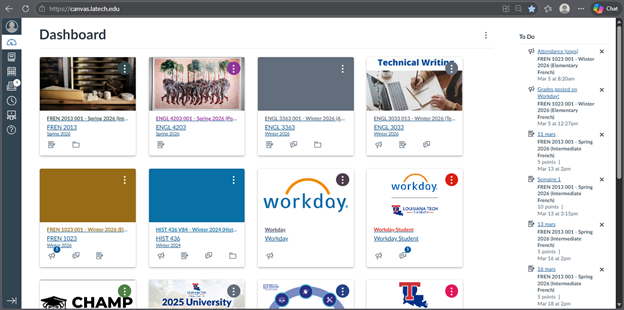
- You will be forwarded to your Canvas home screen
Created on
Updated
byhww008
Was this article helpful?
Contents