
Canvas Basic Guide
Written by Jeremy Neece
What is Canvas?
Canvas is a web-based learning management system, or LMS. It is used by learning institutions, educators, and students to access and manage online course learning materials and communicate about skill development and learning achievement. Canvas includes a variety of customizable course creation and management tools, course and user analytics and statistics, and internal communication tools.
Who Can Use Canvas?
Canvas LMS is available for use by students, educators, and administrators. Louisiana Tech University provides Canvas accounts to its users.
- To access Canvas in a web-browser, students and staff go to canvas.latech.edu.
- To get the mobile app, you will need to go to your App Store or the Google Play store. Just search “Canvas” and it should look like a red, spotty circle (see figure 1).

Figure 1 Canvas Application Logo
Basic Canvas Features
Canvas includes a variety of built-in course construction and management tools that can be customized to create unique and accessible teaching and learning experiences.
- Instructional designers and instructors may create and share course content using Assignments, Discussions, Modules, Quizzes, and Pages. They may also choose to foster a collaborative learning experience using Collaborations, Conferences, and Groups. Additionally, course creators can use the Course Import Tool to bulk-upload pre-existing LMS course packages and/or course materials.
- Students use Canvas to view and interact with course materials, view feedback, communicate with their instructor, and interact with other course users.
- Students and instructors can showcase their work by creating their own ePortfolios.
- Canvas also allows institutions and instructors to add state and institutional learning outcomes to rubrics in order to measure and track student skill development and learning achievement. Optionally, instructors can customize the learning experience using Mastery Paths.
- Instructors can provide students with comprehensive feedback on assignment and quiz submissions using SpeedGrader and manage grade reporting in the Canvas Gradebook. Instructors can also allow peer reviews to encourage student-to-student feedback.
- Instructors can facilitate real-time course interactions using Chat and communicate course news and updates with students using Announcements as well as the Calendar and Syllabus. Additionally, all course participants can use the Canvas Inbox to send and receive messages.
- Instructors and admins can gain greater insight into student success and make informed instructional decisions using data provided in Canvas Analytics. Admins can also access SQL data about their Canvas user and usage details from Canvas Data Services.
- Canvas also includes the Canvas App Center, where admins, designers, and instructors can enable a variety of External Apps (LTI Tools) and services. The ever-growing app library offers a wide array of interactive resources, content repositories, assessment tools, social media integrations, and other digital learning and teaching resources.
Need Help?
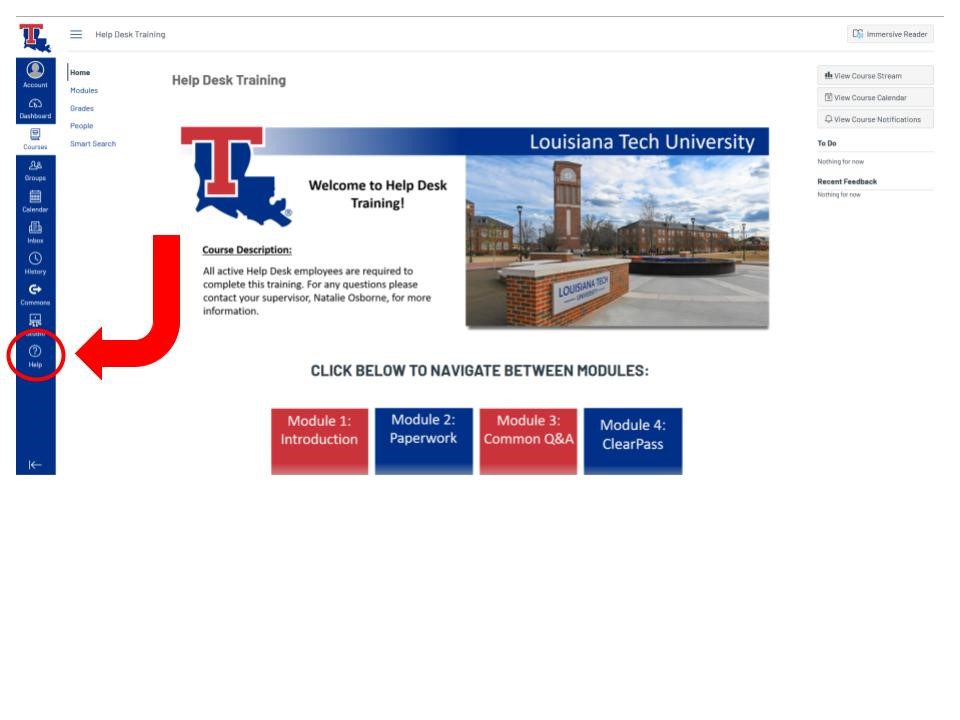
Canvas comes well equipped with 24-hour assistance for students and faculty alike. Once you have logged in, you will see a “Help” button located on the toolbar to the left of the screen. You will be able to access a range of assistance from contacting a professor to live chatrooms with Canvas experts.
If you are still having trouble:
- Contact the Help Desk
- Email: helpdesk@latech.edu
- Phone: 318.257.5300
- Or come see us in person in the basement of Wyly Tower